How to hide Telegram messages containing a word without leaving
If a Telegram channel or group is worth staying in but every message containing one word ruins it for you, you don't have to leave or mute the whole chat. The short answer: muting only silences notifications — it still shows you every message. To actually stop seeing messages containing a word, hide them with a personal word filter that works only in your own view on iPhone and iPad, with no admin rights and without deleting anything.
What Telegram's built-in options actually do
Telegram gives you two built-in escapes when a chat gets noisy: mute it, or leave it. Leaving costs you everything else in the chat. Muting costs you nothing — but it also hides nothing. Neither option lets you stay where you are while skipping just the messages that contain one word.
Why muting is not hiding
Muting a chat only silences notifications. It changes nothing about which messages you see when you open the conversation. If the problem is what you read rather than what pings you, muting won't help.
Mute vs leaving vs a personal word filter
| Mute | Leave | Personal word filter | |
|---|---|---|---|
| Hides messages containing a word for you | No | No — you miss the whole chat | Yes |
| You stay in the chat | Yes | No | Yes |
| Changes anything for other members | No | Yes, you are gone | No |
| Needs admin permissions | No | No | No |
| You can undo it anytime | Yes | Only by rejoining | Yes |
When hiding messages with a word helps
A single word is often all it takes to spoil a chat you otherwise enjoy. Common cases: plot spoilers for a show or match you haven't caught up with, repeated promos and discount codes flooding a busy group, or a recurring topic you simply don't follow. Hiding the messages that contain that word lets you keep everything else — the rest of the conversation stays exactly as it was.
How to hide messages containing a word on iPhone and iPad with Filtergram
Disclosure: Filtergram is our product — an independent Telegram client for channels, groups and forums, built around personal filters and reading controls.
Filtergram adds a personal reading layer on top of the chats you already follow. A word filter hides the messages that contain that word only for you: no admin permissions needed, and the original messages are never deleted.
- Open the channel or group in Filtergram and find a message containing the word.
- Open that message's options and choose Filter “word” in this chat to hide it in that chat only, or Filter “word” in all chats to hide it everywhere.
- You can also add words by hand: in filter settings use Add global keyword, then manage them under Global rules and Per-chat rules, and pause any rule whenever you want.
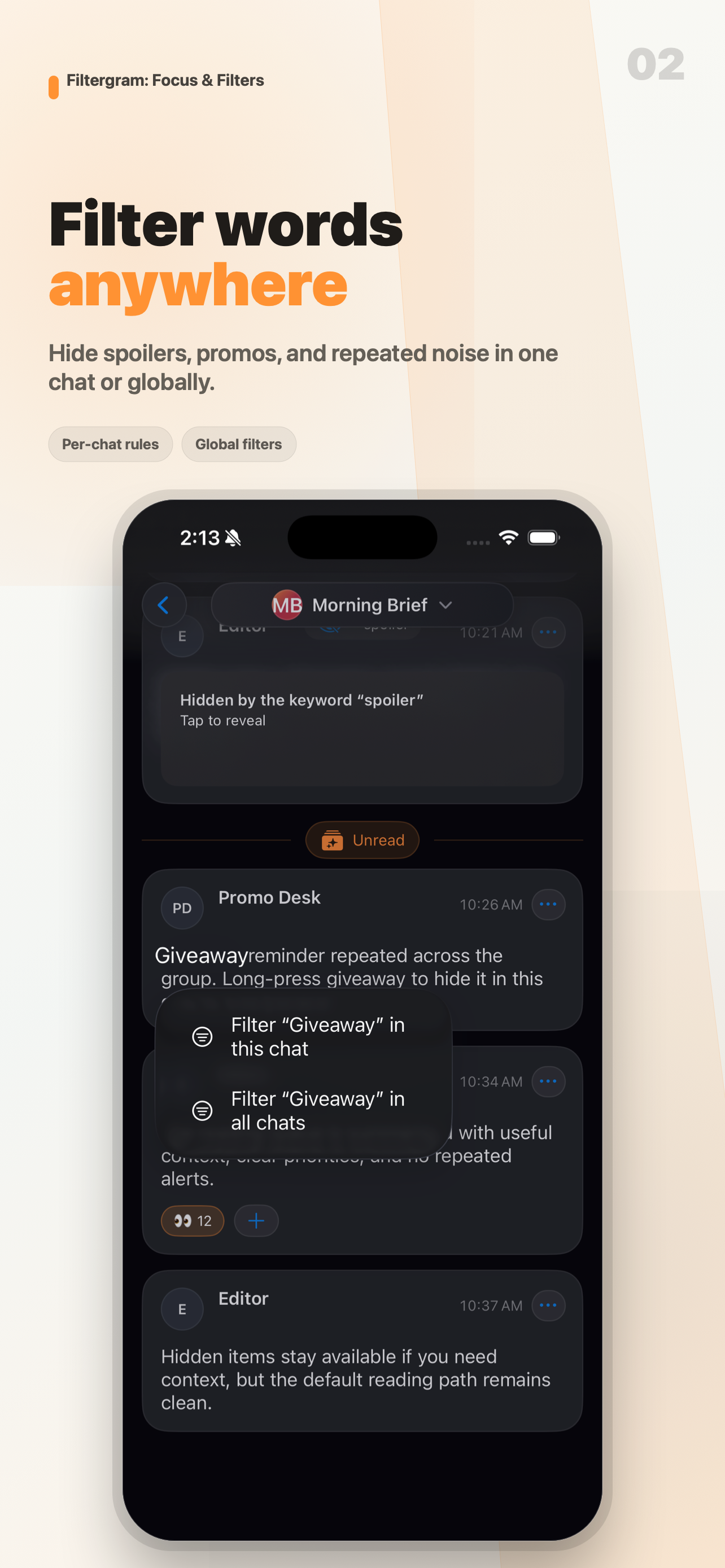
One chat or everywhere
Some words are noise everywhere; others only bother you in one place. Filter in this chat keeps the rule local to that conversation, while Filter in all chats — and the Global rules list — applies the same word across your chats. Per-chat rules let you review and pause each local rule separately.
Reveal a hidden message when you need the context
Hidden messages don't vanish without explanation. They stay marked with the word that hid them, and you can reveal any of them whenever you need the full context of a discussion.
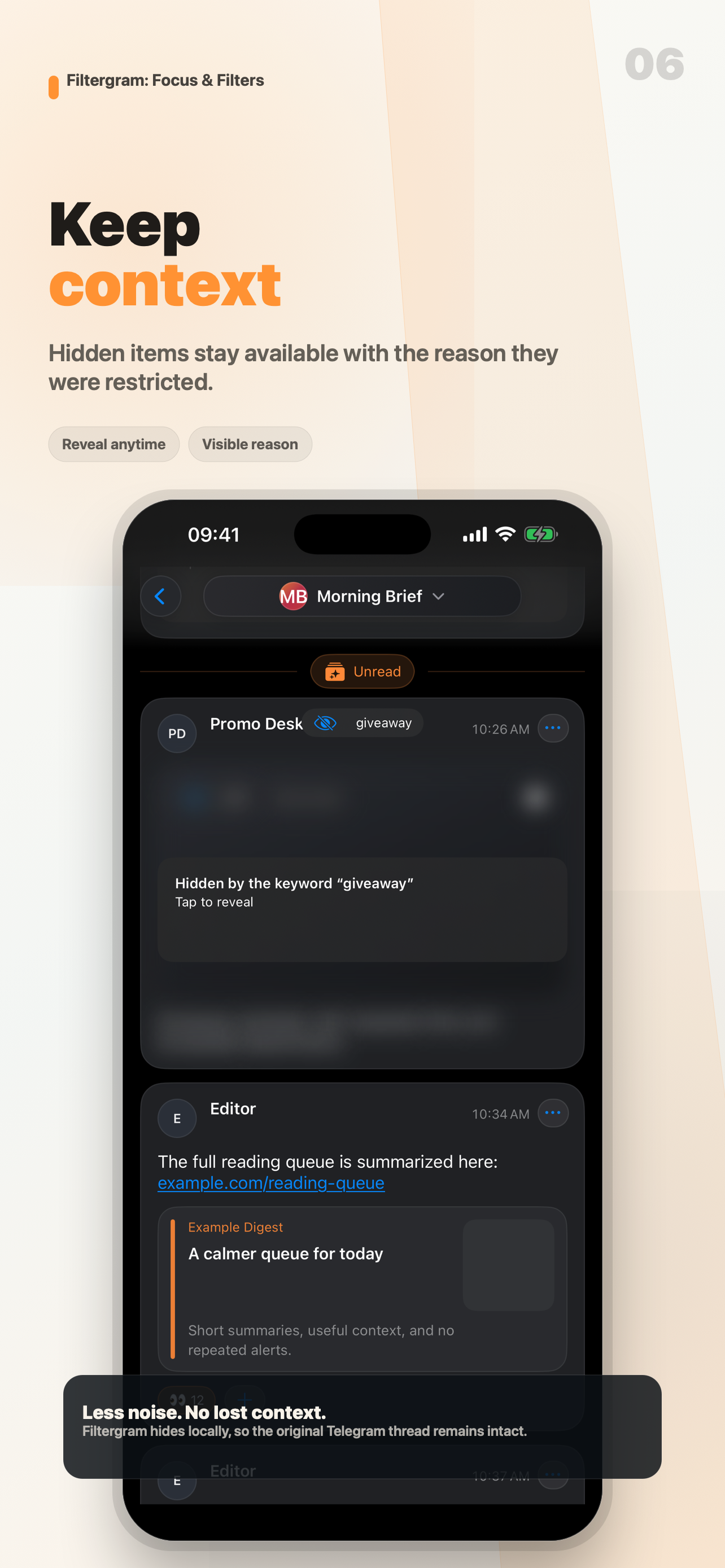
Only your view changes
Everyone else keeps seeing the full conversation. Your word filter is personal: it needs no admin rights, it changes nothing for other members, and the original messages stay intact for the day you want to read them.
Other personal filters
The same personal layer also hides messages from people you don't want to read — see how to hide someone's messages in a Telegram group — as well as content types you don't want to see and forum topics you don't follow. Each filter works only for yourself, and each one is reversible.
What Filtergram doesn't do
Filtergram is personal filtering, not moderation: it can't restrict anything for the chat, it isn't an anti-spam service, and it doesn't replace Telegram. It is focused on channels, groups and forums; private one-to-one chats, secret chats and calls are not supported.
Frequently asked questions
Can I hide a word in only one group?
Yes. Choose Filter “word” in this chat, or keep the rule under Per-chat rules. It will only affect that conversation.
Can I hide the same word everywhere?
Yes. Choose Filter “word” in all chats, or add it with Add global keyword. The word is then hidden across your chats under Global rules, and you can pause it anytime.
Will other people know I'm hiding these messages?
No. Hiding happens only on your device, in your own reading. Nothing changes for the authors or for anyone else in the chat.
Do I need to be an admin?
No. Personal word filters need no permissions because they never touch the shared chat.
Can I reveal a hidden message later?
Yes. Hidden messages stay marked with the word that hid them, and you can reveal them whenever you need the full context.